[IsaacLab Part 4] RL Policy로 Isaac Sim에서 Go2 로봇 걷게하기
학습된 RL policy를 load해 Isaac Sim에서 Unitree Go2를 제어하는 inference 환경 구성을 정리한다.
[IsaacLab Part 4] RL Policy로 Isaac Sim에서 Go2 로봇 걷게하기

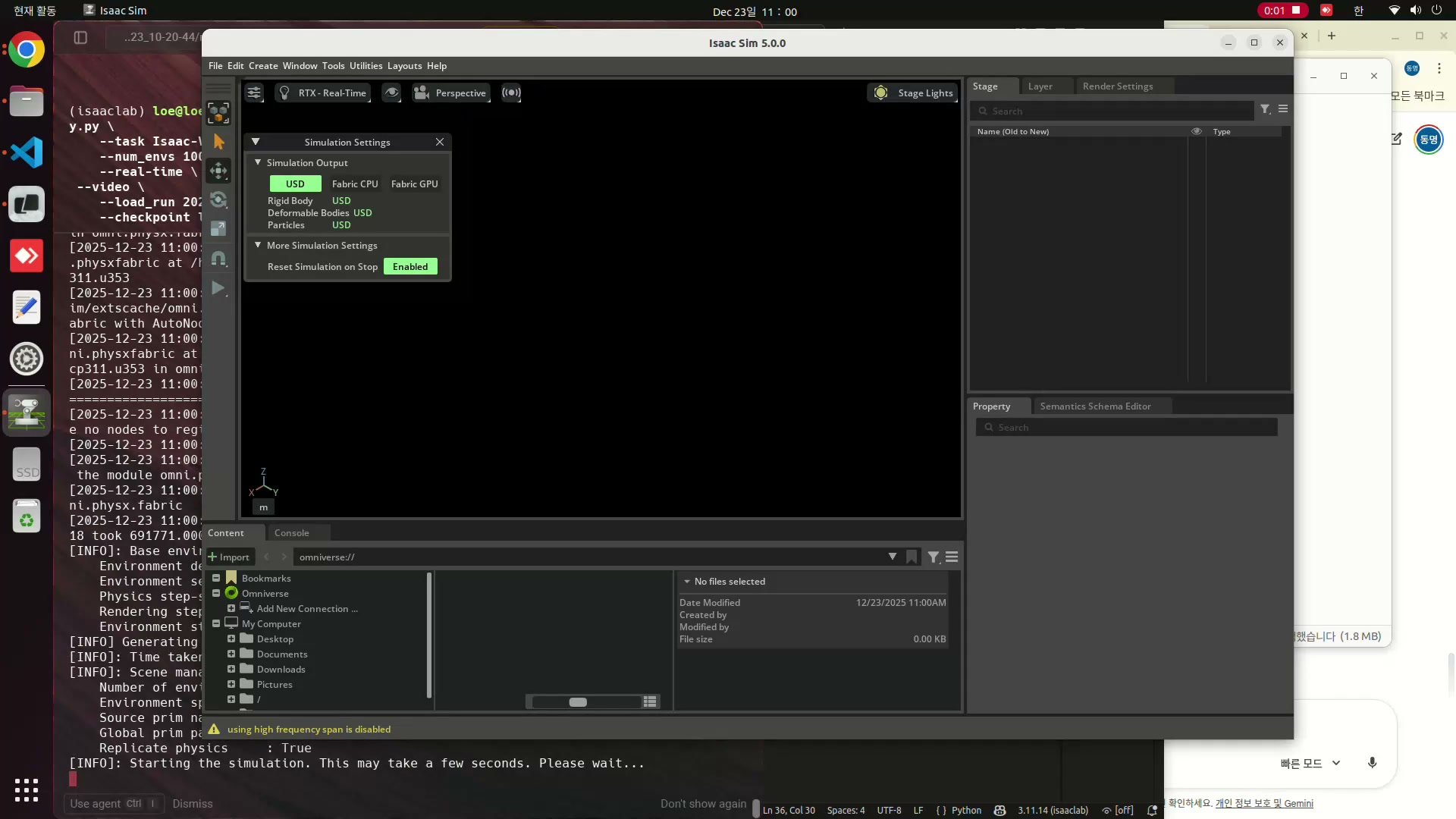
학습완료된 RL 모델
- 이전에 학습한 모델을 load하여 로봇이 움직이는 모습을 play해볼 수 있습니다.
- 초록색 화살표
- 사용자가 로봇에게 내린 목표 선속도 명령(상위 제어)값입니다.
- 파란색 화살표
- 로봇의 현재 실제 속도입니다. 로봇의 base가 실제로 물리엔진 상에서 어느 방향으로 움직이고 있는지를 보여줍니다.
- RL의 목표는 파란색 화살표와 초록색 화살표가 최대한 일치되도록 로봇의 관절(하위제어)을 제어하는 것입니다.
Scene구성 코드 작성
학습한 Policy를 load하기 위해 학습할때와 동일한 Action, Observation, Event의 Cfg를 수립해야 합니다. 이를 위해서 이전 학습시에 사용했던 설정과 동일하게 추론시에도 유지시켜줘야합니다.
- Scene : 지형, 로봇, 센서등을 몇개나 만들고 어떻게 배치할지 결정합니다.
- Observation : 로봇이 현재 상태를 어떻게 파악하고 있는가? 로봇의 속도, 관절 각도, 기울기, 바닥높이등의 정보가 포함됩니다.학습시와 추론시에 정확히 동일한 입력이 들어와야 합니다.
- actions : 관절제어의 출력으로 신경망의 output에 해당합니다. joint의 position를 나타냅니다. 추론시에 output의 scale이 학습시와 동일해야합니다.
- command : 로봇에게 무엇을 하라고 시킬 것인지에 대해서 정의되어 있습니다. 로봇의 목표 속도에 해당합니다.
- reward : 보상에 대해 정의입니다.
- termination : 언제 에피소드를 끝내고 처음부터 다시 시작할 것인지에 대한 설정입니다.
- event : 로봇의 무게를 살짝 바꾸거나, 마찰력을 무작위로 결정하여 학습시 로봇에 강인함을 부여합니다.
- curriculum : 로봇에게 점진적으로 어려운 미션을 부여합니다.
추론시의 Robot ManagerBasedconfig
1
2
3
4
5
6
7
8
9
10
11
12
13
14
15
16
17
18
19
20
21
22
23
24
25
26
27
28
29
30
31
32
33
34
35
36
37
38
39
40
41
42
43
44
45
46
47
48
49
50
51
52
53
54
55
56
57
58
59
60
61
62
63
64
65
66
67
68
69
70
71
72
73
74
75
76
77
78
79
@configclass
class CommandsCfg:
    """Command specifications for the environment."""
    base_velocity = mdp.UniformVelocityCommandCfg(
        asset_name="go2",
        resampling_time_range=(10.0, 10.0),
        rel_standing_envs=0.02,
        rel_heading_envs=1.0,
        heading_command=True,
        heading_control_stiffness=0.5,
        debug_vis=True,
        ranges=mdp.UniformVelocityCommandCfg.Ranges(
            lin_vel_x=(-1.0, 1.0), lin_vel_y=(-1.0, 1.0), ang_vel_z=(-1.0, 1.0), heading=(-3.14, 3.14)
        ),
    )

@configclass
class ActionsCfg:
    """Action specifications for the environment."""
    joint_pos = mdp.JointPositionActionCfg(asset_name="go2", joint_names=[".*"], scale=0.5, use_default_offset=True)

@configclass
class ObservationsCfg:
    """Observation specifications for the environment."""
    @configclass
    class PolicyCfg(ObsGroup):
        """Observations for policy group."""
        # Observation terms (order matters)
        base_lin_vel = ObsTerm(func=mdp.base_lin_vel, params={"asset_cfg": SceneEntityCfg("go2")})
        base_ang_vel = ObsTerm(func=mdp.base_ang_vel, params={"asset_cfg": SceneEntityCfg("go2")})
        projected_gravity = ObsTerm(func=mdp.projected_gravity, params={"asset_cfg": SceneEntityCfg("go2")})
        velocity_commands = ObsTerm(func=mdp.generated_commands, params={"command_name": "base_velocity"})
        joint_pos = ObsTerm(func=mdp.joint_pos_rel, params={"asset_cfg": SceneEntityCfg("go2")})
        joint_vel = ObsTerm(func=mdp.joint_vel_rel, params={"asset_cfg": SceneEntityCfg("go2")})
        actions = ObsTerm(func=mdp.last_action)
        height_scan = ObsTerm(
            func=mdp.height_scan,
            params={"sensor_cfg": SceneEntityCfg("height_scanner")},
            clip=(-1.0, 1.0),
        )

        def __post_init__(self):
            self.enable_corruption = True
            self.concatenate_terms = True

    # policy group
    policy: PolicyCfg = PolicyCfg()


@configclass
class EventCfg:
    """Configuration for events."""
    # 로봇 초기 위치 및 자세 설정 (Reset)
    reset_base = EventTerm(
        func=mdp.reset_root_state_uniform,
        mode="reset",
        params={
            "pose_range": {"x": (-0.5, 0.5), "y": (-0.5, 0.5), "yaw": (-3.14, 3.14)},
            "velocity_range": {
                "x": (-0.5, 0.5),
                "y": (-0.5, 0.5),
                "z": (-0.5, 0.5),
                "roll": (-0.5, 0.5),
                "pitch": (-0.5, 0.5),
                "yaw": (-0.5, 0.5),
            },
            "asset_cfg": SceneEntityCfg("go2"),
        },
    )

    reset_robot_joints = EventTerm(
        func=mdp.reset_joints_by_scale,
        mode="reset",
        params={
            "position_range": (0.5, 1.5), # 기본 자세(default joint pos) 주변에서 랜덤화
            "velocity_range": (0.0, 0.0),
            "asset_cfg": SceneEntityCfg("go2"),
        },
    )
- CommandsCfg : 로봇에게 x,y의 선속도와 z의 각속도 명령을 줍니다. head이 지정되어 있어 로봇이 특정 방향으로 움직입니다.
- ActionCfg : 로봇의 Position control 방식을 사용하며 이는 목표 각도를 설정하면 시뮬레이션의 PD controller가 그 각도로 움직이기 위한 힘을 계산하는 방식입니다. use_default_offset = True로 하여 기본자세에서 얼마나 움직일지를 계산합니다. scale을 0.5로 하여 목표각도 = (기본자세 + AI출력 * 0.5)가 됩니다.
- ObservationCfg : 로봇의 감각정보를 정의합니다. base의 선속도, 각속도, 중력방향, 관절의 위치와 속도, 이전 행동들과 target command, height_scan등의 입력값이 있습니다.
- eventCfg : 로봇 몸체의 위치와 속도를 랜덤하게 정하거나 joint의 pose를 랜덤하게 설정해줍니다.
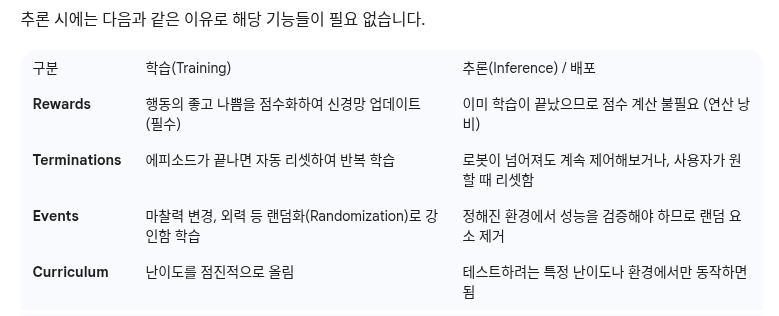
- 나머지 : RewardsCfg, TerminationsCfg, CurriculumCfg 등은 추론시에 필요하지 않으므로 pass 해줍니다.
1
2
3
4
5
6
7
8
9
10
11
12
13
14
15
16
17
18
19
20
21
22
23
24
25
26
27
28
29
30
31
32
33
34
35
36
37
38
39
40
41
42
43
44
45
46
47
48
49
50
51
52
53
54
55
56
57
58
59
60
61
62
63
64
65
66
67
68
69
70
71
72
73
74
75
@configclass
class Go2RLEnvCfg(ManagerBasedRLEnvCfg):
    """Configuration for the RL environment."""
    # Scene settings
    scene: Myscene = Myscene(num_envs=1, env_spacing=2.5)
    # Basic settings
    observations: ObservationsCfg = ObservationsCfg()
    actions: ActionsCfg = ActionsCfg()
    commands: CommandsCfg = CommandsCfg()
    # dummy settings
    events: EventCfg = EventCfg()
    rewards: RewardsCfg = RewardsCfg()
    terminations: TerminationsCfg = TerminationsCfg()
    curriculum: CurriculumCfg = CurriculumCfg()

    def __post_init__(self):
        """Post initialization."""
        # viewer settings
        self.viewer.eye = [-4.0, 0.0, 5.0]
        self.viewer.lookat = [0.0, 0.0, 0.0]

        # general settings
        self.decimation = 8
        self.episode_length_s = 20.0
        self.is_finite_horizon = False
        self.actions.joint_pos.scale = 0.25

        # simulation settings
        self.sim.dt = 0.005
        self.sim.render_interval = self.decimation
        self.sim.disable_contact_processing = True
        self.sim.render.antialiasing_mode = None

        if self.scene.height_scanner is not None:
            self.scene.height_scanner.update_period = self.decimation * self.sim.dt


def go2_rl_env(env_cfg,cfg):

    env = gym.make("Isaac-Velocity-Rough-Unitree-Go2-v0", cfg=env_cfg, render_mode="rgb_array")
    with open(cfg.agent_cfg_path, 'r') as f:
        unitree_go2_rough_cfg = yaml.safe_load(f)
    agent_cfg = RslRlOnPolicyRunnerCfg(**unitree_go2_rough_cfg)
    env = RslRlVecEnvWrapper(env, clip_actions=agent_cfg.clip_actions)
    ppo_runner = OnPolicyRunner(env, agent_cfg.to_dict(), log_dir=None, device=agent_cfg.device)


    model_path = get_checkpoint_path(log_path=os.path.abspath("models"),
                                run_dir=agent_cfg.load_run,
                                checkpoint=agent_cfg.load_checkpoint)

    ppo_runner.load(model_path)

    # obtain the trained policy for inference
    policy = ppo_runner.get_inference_policy(device=env.unwrapped.device)

    # extract the neural network module
    # we do this in a try-except to maintain backwards compatibility.
    try:
        # version 2.3 onwards
        policy_nn = ppo_runner.alg.policy
    except AttributeError:
        # version 2.2 and below
        policy_nn = ppo_runner.alg.actor_critic

    # export policy to onnx/jit
    export_model_dir = os.path.join(os.path.dirname(model_path), "exported")
    export_policy_as_jit(policy_nn, ppo_runner.obs_normalizer, path=export_model_dir, filename="policy.pt")
    export_policy_as_onnx(
        policy_nn, normalizer=ppo_runner.obs_normalizer, path=export_model_dir, filename="policy.onnx"
    )

    return env, policy
Go2RLEnvCfg
ManagerBasedRlEnvCfg를 상속받는 class로써 다양한 맴버변수와 메소드를 가지고 있다. RL환경에 맞는 scene, observation, actions..와 같은 설정을 넣어준 후 post_init() 함수를 통해 다양한 멤버변수를 지정해줍니다.
- self.viewer = isaaclab에서의 viewer의 Cfg로써 카메라 초기 시점과 방향을 지정해줍니다.
- decimation : 한번에 업데이트될 action들의 숫자를 나타낸다. actions의 수가 8개 이므로 8로 지정합니다.
- episode_length_s : 한 에피소드의 지속시간을 나타냅니다.
- is_finite_horizon : 에이전트가 시간제한이 있음을 인지하고 학습할지, 아니면 끝이 없는 것처럼 학습할지를 결정합니다.
- sim : simulation physics에 대한 설정으로 dt는 물리엔진이 한 번의 계산으로 점프하는 시간 간격이고 render_interval은 물리계산 몇번당 화면을 한번 새로 고칠지 정하는 설정입니다.
go2_rl_env
1
2
3
4
5
6
7
8
9
10
11
12
13
14
15
16
17
18
19
20
21
22
23
24
25
26
27
28
29
30
31
32
33
34
35
36
def go2_rl_env(env_cfg,cfg):

    env = gym.make("Isaac-Velocity-Rough-Unitree-Go2-v0", cfg=env_cfg, render_mode="rgb_array")
    with open(cfg.agent_cfg_path, 'r') as f:
        unitree_go2_rough_cfg = yaml.safe_load(f)
    agent_cfg = RslRlOnPolicyRunnerCfg(**unitree_go2_rough_cfg)
    env = RslRlVecEnvWrapper(env, clip_actions=agent_cfg.clip_actions)
    ppo_runner = OnPolicyRunner(env, agent_cfg.to_dict(), log_dir=None, device=agent_cfg.device)


    model_path = get_checkpoint_path(log_path=os.path.abspath("models"),
                                run_dir=agent_cfg.load_run,
                                checkpoint=agent_cfg.load_checkpoint)

    ppo_runner.load(model_path)

    # obtain the trained policy for inference
    policy = ppo_runner.get_inference_policy(device=env.unwrapped.device)

    # extract the neural network module
    # we do this in a try-except to maintain backwards compatibility.
    try:
        # version 2.3 onwards
        policy_nn = ppo_runner.alg.policy
    except AttributeError:
        # version 2.2 and below
        policy_nn = ppo_runner.alg.actor_critic

    # export policy to onnx/jit
    export_model_dir = os.path.join(os.path.dirname(model_path), "exported")
    export_policy_as_jit(policy_nn, ppo_runner.obs_normalizer, path=export_model_dir, filename="policy.pt")
    export_policy_as_onnx(
        policy_nn, normalizer=ppo_runner.obs_normalizer, path=export_model_dir, filename="policy.onnx"
    )

    return env, policy
- gym.make 를 통해 미리 등록된 Go2 환경의 ID “Isaac-Velocity-Rough-Unitree-Go2-v0”를 호출 하여 시뮬레이션을 생성합니다. 이때 앞서서 정의한 env_cfg가 적용됩니다. rsl_rl에 필요한 하이퍼파라미터가 담긴 yaml파일 을 읽어옵니다.
- RslRlVecEnvWrapper 를 통해 isaaclab의 환경 객체를 rsl_rl 라이브러리가 이해할 수 있는 규격으로 변환합니다. clip_actions를 통해 agent의 action의 범위를 과도하지 않게 제어합니다.
- OnPolicyRunner 를 통해 환경과 네트워크의 설정을 결합하여 추론을 관리합니다. 환경(Env)과 신경망(Actor-Critic) 사이에서 데이터를 주고받으며 학습과 추론의 모든 과정을 관리 하는 객체입니다.
- Data Collection : 환경(Isaac Lab)으로부터 관측값(obs)을 받아 신경망에 넣고 행동(action)을 결정합니다.
- Storage : 로봇이 움직이며 얻은 보상(reward), 다음 상태, 에피소드 종료 여부 등을 메모리(Rollout Storage)에 차곡차곡 쌓습니다.
- Update : 데이터가 충분히 쌓이면(예: 24스텝마다), PPO 알고리즘 을 사용해 신경망의 가중치를 업데이트합니다.
- model 폴더 안에 모델파일을 찾고 load해줍니다. 이후 get_inference_policy를 통해 policy객체를 얻습니다.
시뮬레이션 실행
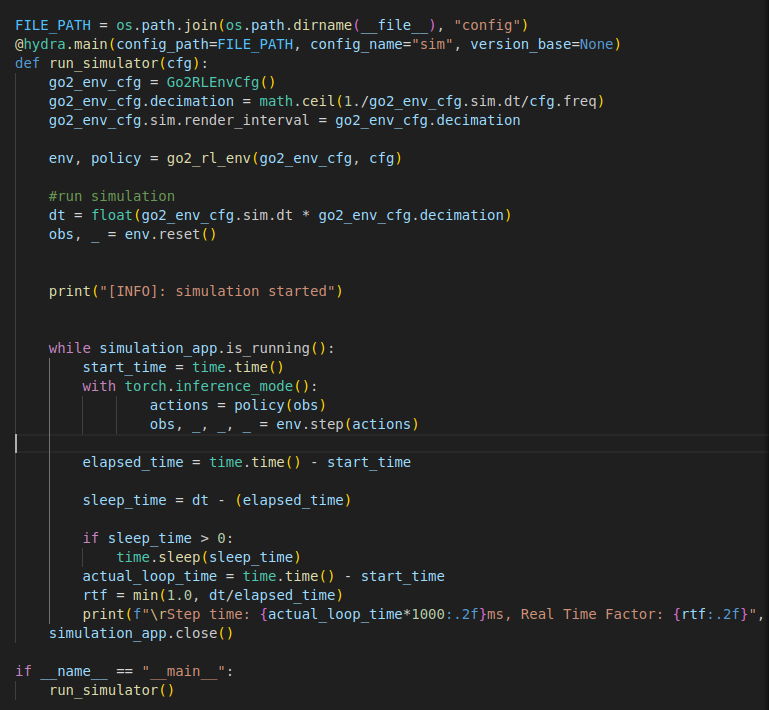
policy에서 commandCfg를 주는대로 로봇이 학습된대로 움직이는 모습을 볼 수 있습니다. 10초마다 (x,y,yaw) 명령을 주는대로 로봇이 움직입니다.
다음으로 구현할 내용은 아래와 같습니다.
키보드 입력을 통해 teleop으로 로봇을 조종하는 것
ros2 node를 통해 로봇개의 센서데이터 받아보기
nav2와 같은 패키지로 go2 조정하기
이 기사는 저작권자의 CC BY 4.0 라이센스를 따릅니다.